
How to install WatchOS 8 update on your Apple Watch easily
- Rami Hollingsworth
- Sep 20, 2021
- 5 min read

WatchOS 8 update is here! The quickest and easiest way to download and install watchOS 8 is over-the-air, directly on your Apple Watch. Another route to get your Apple Watch updated is through a paired iPhone.
Install watchOS 8 from your Apple Watch
Make sure you have a least 50 percent charge and connected to WiFi .
Go to the Settings app from your Home screen.
Go to General.
Go to Software Update.
Go to Download and Install.
If you have a Passcode(which you should!), enter it.
Tap Agree to the Terms and Conditions
Once complete you should see a prompt saying your Watch was updated. It can take up to hour so be patient.
Install watchOS 8 from your iPhone
Make sure your iPhone is up to date.
Open the Watch app from your Home Screen.
Go to General.
Go to Software Update.
Go to Download and Install.
If you have a Passcode(which you should!), enter it.
Tap Agree to the Terms and Conditions.
Once complete you should see a prompt saying your Watch was updated. It can take up to hour.
What’s new in watchOS 8
watchOS 8 brings you new ways to stay healthy, active, and connected. A redesigned Photos app helps you stay connected to your most precious memories, and the new Mindfulness app and new Tai Chi and Pilates workout types will help you lead a healthy and fit life. And updates to Wallet and Home make it simple and convenient to access your house, car, and even the places you love to visit.
For information on the security content of Apple software updates, please visit this website: https://support.apple.com/HT201222
Need to update your iPhone to iOS 15. Check here.
Everything in the watchOS 8 update
watchOS 8 brings you new ways to stay healthy, active and connected. A redesigned Photos app helps you stay connected to your most precious memories, and the new Mindfulness app and new Tai Chi and Pilates workout types will help you lead a healthy and fit life. And updates to Wallet and Home make it simple and convenient to access your house, car, and even the places you love to visit.
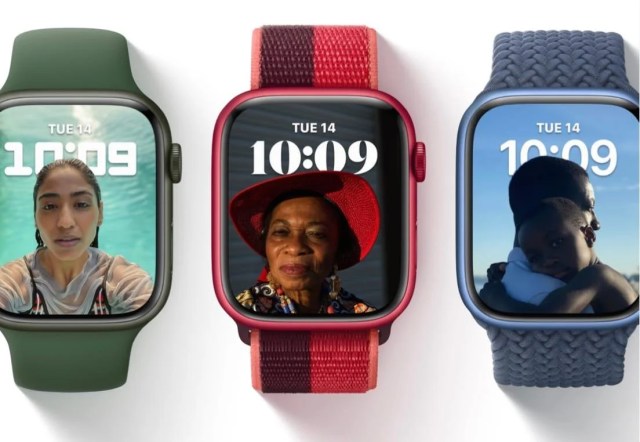
Watch Faces
Portraits face uses segmentation data from portrait photos taken on iPhone to create an immersive, multi-layered face (Apple Watch Series 4 and later)
World Time face lets you track the time in 24 different time zones at once (Apple Watch Series 4 and later)
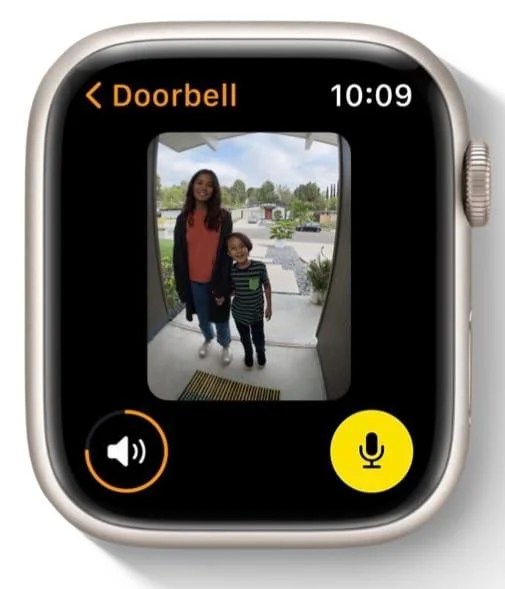
Home
Status and controls for accessories in your home now appear at the top of the Home app
Quick views to see if accessories are on, have a low battery, require a software update, and more
Accessories and scenes dynamically appear based on the time of day and frequency of use
Dedicated camera room for viewing all available HomeKit camera feeds in one place, with support for multiple aspect ratios
Favorites area gives you access to the scenes and accessories that you use most
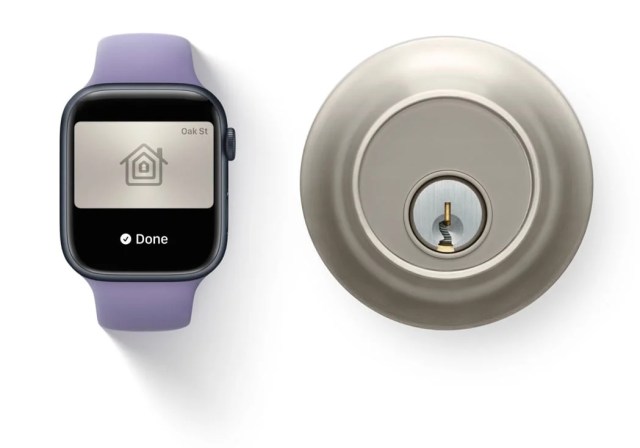
Wallet
Home keys let you tap to unlock a supported home or apartment door lock
Hotel keys allow you to tap to unlock your room at participating hotels
Office keys allows you to tap to unlock your office doors for participating corporate offices
Car keys with Ultra Wideband on Apple Watch Series 6 let you unlock, lock, and start your supported vehicle as you approach
Remote keyless entry functions on your car keys allow you to lock, unlock, honk your horn, preheat your car, or open your trunk
Workout
New custom algorithms in the Workout app for Tai Chi and Pilates provide accurate tracking of calorie metrics
Automatic Outdoor Cycling workout detection sends a reminder to start the Workout app, giving you retroactive credit for exercise already started
Automatic pause and resume for Outdoor Cycling workouts
Improved accuracy of calorie metrics for Outdoor Cycling workouts while riding an e-bike
Users 13 and under can now track hiking workouts with more accurate metrics
Voice feedback announces workout milestones using the built-in speaker or connected Bluetooth device
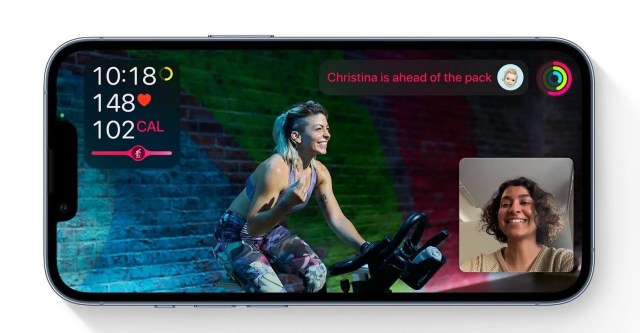
Fitness+
Guided Meditations can help you practice meditation, featuring audio sessions on Apple Watch and video sessions on iPhone, iPad, and Apple TV that guide you through specific themes
Pilates workouts are now available, with new workouts every week that are designed to improve strength and flexibility
Support for Picture-in-Picture viewing on iPhone, iPad, and Apple TV, so you can watch your workout while you also view other content in compatible apps
Expanded workout filters for Yoga, Strength, Core, and HIIT workouts, including whether equipment is required
Mindfulness
Mindfulness app includes an enhanced Breathe experience along with a new Reflect session
Breathe sessions have tips that help add a physical connection to deep-breathing practices and a new animation to guide your session
Reflect sessions give you a simple idea to focus your thoughts, along with a visualization that shows the passing of a minute
Sleep
Respiratory rate is measured by Apple Watch during sleep
Ability to review respiratory rate during sleep in the Health app, and be notified if a trend has been detected
Messages
Ability to compose or reply to messages by using Scribble, dictation, and emoji all from the same screen
Ability to adjust dictated text by using the Digital Crown to scroll to where you want to edit
Support for #images in Messages allows you to search for a GIF or select one you’ve used recently
Photos
Redesigned Photos app allows you to view and manage your photo library from your wrist
Highlights from Memories and featured photos, in addition to your favorites, sync to Apple Watch with new content generated daily
Photos from synced Memories will be displayed in a mosaic-style grid, highlighting some of your best shots with a larger photo
Ability to share photos through Messages and Mail
Find My
Find Items app allows you to locate items with an attached AirTag and compatible third-party products with the Find My network
Find Devices app helps you locate your misplaced Apple devices, as well as devices owned by someone in your Family Sharing group
Find My separation alerts notify you if you leave your Apple device, AirTag, or compatible third-party item behind
Weather
Next-hour precipitation notifications alert you when rain or snow is about to start or stop
Severe weather notifications alert you about certain events including tornados, winter storms, flash floods, and more
Precipitation chart that visually depicts the intensity of the rain
Other features and improvements:
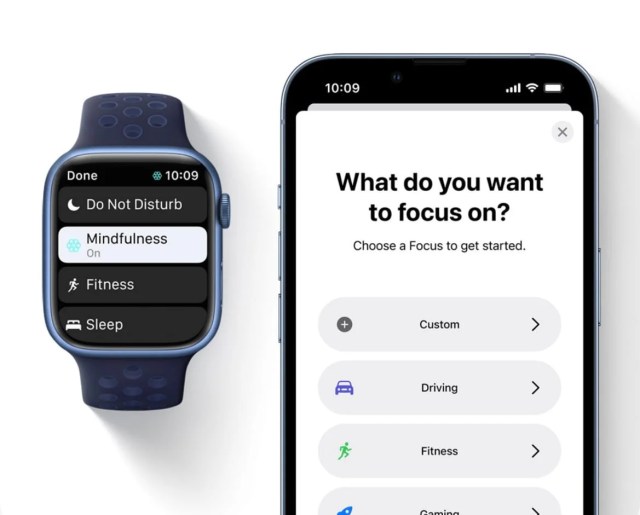
Focus lets you automatically filter notifications based on your current activity, such as fitness, sleep, gaming, reading, driving, work, or personal time
Apple Watch automatically aligns with any Focus that you set in iOS, iPadOS or macOS, so you can manage notifications and stay focused
Contacts app gives you the ability to access, share, and edit your contacts
Tips app provides collections of helpful hints and suggestions for how to best use your Apple Watch and its built-in apps
Redesigned Music app allows you to find and listen to music and radio all in one place
Ability to share songs, albums, and playlists in the Music app through Messages and Mail
Support for multiple timers, including Siri support for adding labels to timers
Cycle Tracking can now use heart rate data from Apple Watch to improve predictions
New Memoji stickers to send a shaka, a handwave, a lightbulb moment, and more
Over 40 outfit choices and up to three different colors to customize your Memoji stickers’s clothing and headwear
Real-time measurement of your headphone audio level in Control Center when listening to media
Ability to add transit cards in Wallet for Family Setup users in Hong Kong, Japan, and select cities in China mainland and US
Google account support for Calendar and Mail for Family Setup users
AssistiveTouch allows users with upper limb differences to answer calls, control an onscreen pointer, launch a menu of actions, and more, using hand gestures like a pinch or a clench
Additional larger text size option available in Settings
Support for the ECG app on Apple Watch Series 4 or later in Lithuania
Support for irregular heart rhythm notifications in Lithuania


Comments